Desktop Studio for Dataset Curation & Fine-Tuning

A powerful desktop application to scrape, generate synthetic data from documents, merge, analyze, build datasets, and fine-tune models with an Unsloth-based LoRA training stack. Train on RunPod or locally, run fully local inference, then ship to Hugging Face Hub.

What is FineFoundry?

A complete desktop studio for ML dataset curation and model fine-tuning

Changelog Highlights

Added
  • Sample Prompts from Dataset — Quick Local Inference now shows 5 random prompts from your training dataset for instant testing
  • Dataset Selector (Inference Tab) — Select any saved dataset to sample prompts from, not just the training dataset
  • Export Chats — Save your inference prompt/response history to text files from both Training and Inference tabs
  • Refresh buttons for getting new random sample prompts
  • System Check (Settings Tab) — One-click diagnostics panel that runs focused pytest groups and coverage from within the app, streams live logs, shows grouped health summary cards, and lets you download the log.
  • Resilient Scraping — HTTP scrapers now include polite rate limiting and automatic retries with exponential backoff for 4chan, Reddit, and Stack Exchange.
Improved
  • Chat Template Support — Inference now properly applies model chat templates for instruct models (e.g., Llama-3.1)
  • Repetition Penalty — Added default repetition penalty (1.15) to prevent degenerate/looping outputs
  • Response-Only Output — Inference responses no longer echo the prompt back
  • Multi-turn conversations in Full Chat View now use proper chat templates
  • Expanded test coverage across scrapers, orchestration helpers, training configs, local Docker training, and UI wiring for Quick Local Inference and the Inference tab.

Added
  • Database-Only Storage — SQLite database (finefoundry.db) is now the sole storage mechanism for all application data
  • Database Logging — All logs stored in app_logs table with queryable access
  • Training Runs Table — Track training runs with metadata, checkpoints, and logs in database
  • Database sessions for scrape history, merge operations, and training configs
  • Export to JSON available for external tool compatibility
Improved
  • Removed all filesystem fallbacks — cleaner, more reliable data management
  • Temporary OS-managed workspaces for synthetic data generation
  • Expanded test coverage to 483 tests
  • Complete documentation overhaul reflecting database-only architecture
Removed
  • ff_settings.json — Settings now in database
  • src/saved_configs/ — Training configs now in database
  • logs/ directory — Logs now in database
  • All JSON file output paths from UI — Data saved to database sessions

Added
  • Synthetic Data CLI — Full command-line interface for synthetic data generation with all GUI capabilities
  • --verbose flag for detailed debug output during generation
  • --config flag to load options from YAML config files
  • --keep-server flag for model caching between batch runs (10x faster subsequent runs)
  • Progress bars with tqdm for chunk processing visualization
  • Automatic vLLM server detection and reuse for faster batch processing
Improved
  • Time estimates during synthetic generation showing remaining time per chunk
  • Enhanced error messages for CUDA, OOM, and dependency issues
  • Expanded test coverage to 414 tests

Added
  • Synthetic Data Generation — Generate Q&A pairs, chain-of-thought reasoning, or summaries from your own documents (PDF, DOCX, TXT, HTML, URLs) using local LLMs powered by Unsloth's SyntheticDataKit
  • Immediate snackbar feedback during model loading (~30-60s on first run)
  • Live progress updates during synthetic generation with per-chunk status
  • Database integration for synthetic data — all generated pairs saved to SQLite
  • Standardized preview display for synthetic data matching other scrapers
Improved
  • Async model loading to prevent UI blocking during synthetic generation
  • Comprehensive documentation updates for synthetic data feature
  • Expanded test coverage from 94 to 200 tests (25% coverage threshold)
  • New tests for database, scrapers, and synthetic data modules

Added
  • New Inference Tab for local inference against fine-tuned adapters with prompt history and Full Chat View
  • Unsloth-based LoRA training image and shared local inference stack powering the Training and Inference tabs
Improved
  • Project reorganization and codebase restructuring for better maintainability
  • Major UI cleanup with substantial visual improvements across the application
Fixed
  • Various bug fixes and stability improvements

Added
  • Ability to save run configurations in the Training tab for quick reruns
Improved
  • Unified configuration settings across the app for a more consistent experience
  • Improved Training tab reliability by addressing multiple training bugs

Added
  • Inline preview of merged datasets with first 100 records
  • Raw dataset preview and ChatML preview integration
  • Comprehensive documentation guides and reorganized structure
Improved
  • Migrated from pip to uv for faster dependency management
  • Updated Hugging Face Hub integration and added huggingface-hub dependency
  • Removed unused imports and consolidated helper functions
  • Code cleanup and refactoring across main modules

Added
  • ChatML format support with multiturn conversation capabilities
  • Standard pairs format option alongside ChatML for dataset output
  • n8n workflow dispatch inputs and callback notifications to CI pipeline
  • GitHub Actions workflow automation
Improved
  • Reorganized scrapers into dedicated module with updated imports
  • Enhanced scraper functionality with small patches and improvements
  • Simplified CI workflow by removing matrix strategy
  • Consolidated n8n callbacks into dedicated job

Initial Release
  • Multi-source scraping (4chan, Reddit, Stack Exchange)
  • Dataset merging and analysis capabilities
  • Build and publish datasets to Hugging Face Hub
  • Model fine-tuning support on RunPod and local Docker
  • LoRA fine-tuning with checkpoint resumption
  • Native desktop application built with Flet
  • Comprehensive dataset analysis tools (sentiment, toxicity, duplicates)

All-in-One ML Data Pipeline

FineFoundry is a native desktop application built with Flet that streamlines the entire machine learning data workflow. From scraping raw data to fine-tuning models, everything happens in one intuitive interface.

Data Collection
  • Scrape from 4chan, Reddit, Stack Exchange
  • Synthetic data generation from PDFs, documents, URLs
  • Contextual and adjacent pairing modes
  • Robust text cleaning and preprocessing
Dataset Management
  • Merge multiple datasets seamlessly
  • Comprehensive dataset analysis
  • Build train/val/test splits
  • Push to Hugging Face Hub with auto-generated cards
Model Training
  • Train on RunPod or locally with Docker
  • LoRA and parameter-efficient fine-tuning
  • Auto-resume from checkpoints
  • Direct Hub integration for model uploads
Analysis & Insights
  • Sentiment and toxicity analysis
  • Duplicate detection and similarity metrics
  • Class balance and distribution insights
  • Data leakage detection
View Repository

Features

Everything you need for dataset curation and model fine-tuning

Multi-Source Data Collection

Scrape from 4chan, Reddit, Stack Exchange, or generate synthetic data from PDFs and documents using local LLMs.

Dataset Merging

Combine multiple database sessions (and optionally Hugging Face datasets when online) into unified training sets with automatic column mapping.

Comprehensive Analysis

Analyze datasets with sentiment, toxicity, duplicates, class balance, and data leakage detection modules.

Publish

Create train/val/test splits and push to Hugging Face Hub with auto-generated dataset cards.

Flexible Training

Train models on RunPod or locally via Docker using an Unsloth-based LoRA fine-tuning stack with shared configs and outputs.

LoRA Fine-Tuning

Parameter-efficient fine-tuning with LoRA via Unsloth, packing support, and automatic checkpoint resumption.

Technical Highlights

Native Desktop App

Built with Flet for cross-platform native UI

Unsloth Training

LoRA fine-tuning with PyTorch, Transformers, PEFT, bitsandbytes

Hub Integration

Seamless Hugging Face Hub push and pull

RunPod Automation

Automated pod and network volume management

Privacy-Focused

All processing happens locally on your machine

Contextual Pairing

Quote-chain, cumulative, and adjacent modes

Modular Architecture

Use as GUI or programmatic API

MIT Licensed

Open source and free to use

Documentation

Everything you need to get started with FineFoundry

Quick Start

Installation (uv recommended)

Clone the repo and run with uv, or use a classic virtualenv.

# Recommended: uv (matches project docs)
git clone https://github.com/SourceBox-LLC/FineFoundry.git FineFoundry-Core
cd FineFoundry-Core

# Install uv if needed
pip install uv

# Run the app (creates an isolated env and installs deps)
uv run src/main.py

# Alternative: classic venv + pip
python -m venv venv

# Activate (Windows PowerShell)
./venv/Scripts/Activate.ps1

# Activate (macOS/Linux)
source venv/bin/activate

# Install dependencies
pip install -e .
Launch the App

Start the desktop application

# If using uv (recommended)
uv run src/main.py

# If using a virtualenv + pip
python src/main.py

# Or use Flet directly
flet run src/main.py

The desktop window will open with tabs for Data Sources, Dataset Analysis, Merge Datasets, Training, Inference, Publish, and Settings.

Prerequisites: Python 3.10+ on Windows, macOS, or Linux. Optional: Hugging Face account for Hub integration.
Offline Mode: Disables Hugging Face Hub actions and RunPod training; the app enforces local-only workflows.

Data Sources Tab

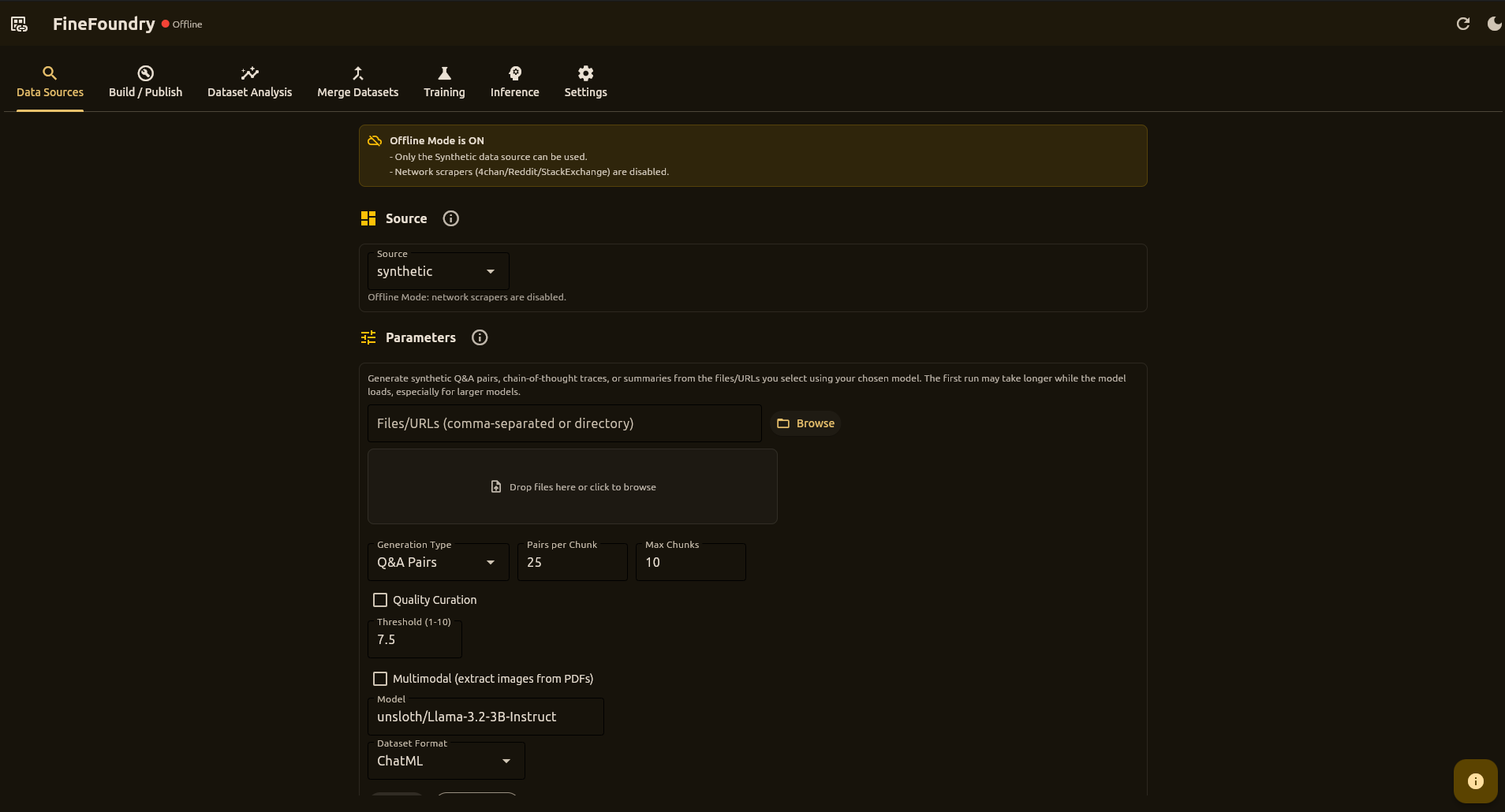
Collect conversational training data from multiple sources with configurable pairing modes.

Data Sources Tab Screenshot
Supported Sources
4chan

Multi-board scraping with quote-chain and cumulative pairing

Reddit

Subreddits or single posts with parent-child threading

Stack Exchange

Q&A pairs from accepted answers

Synthetic

Generate Q&A, CoT, or summaries from PDFs/docs using local LLMs

Key Features
  • Pairing Modes: Contextual (quote-chain), adjacent, or cumulative
  • Synthetic Generation: Q&A pairs, chain-of-thought, summaries from documents
  • Parameters: Max threads, max pairs, delay, min length
  • Live Progress: Real-time stats, logs, and progress bar
  • Preview: Inspect data in two-column grid before saving
  • Database Storage: All data saved to SQLite for history tracking

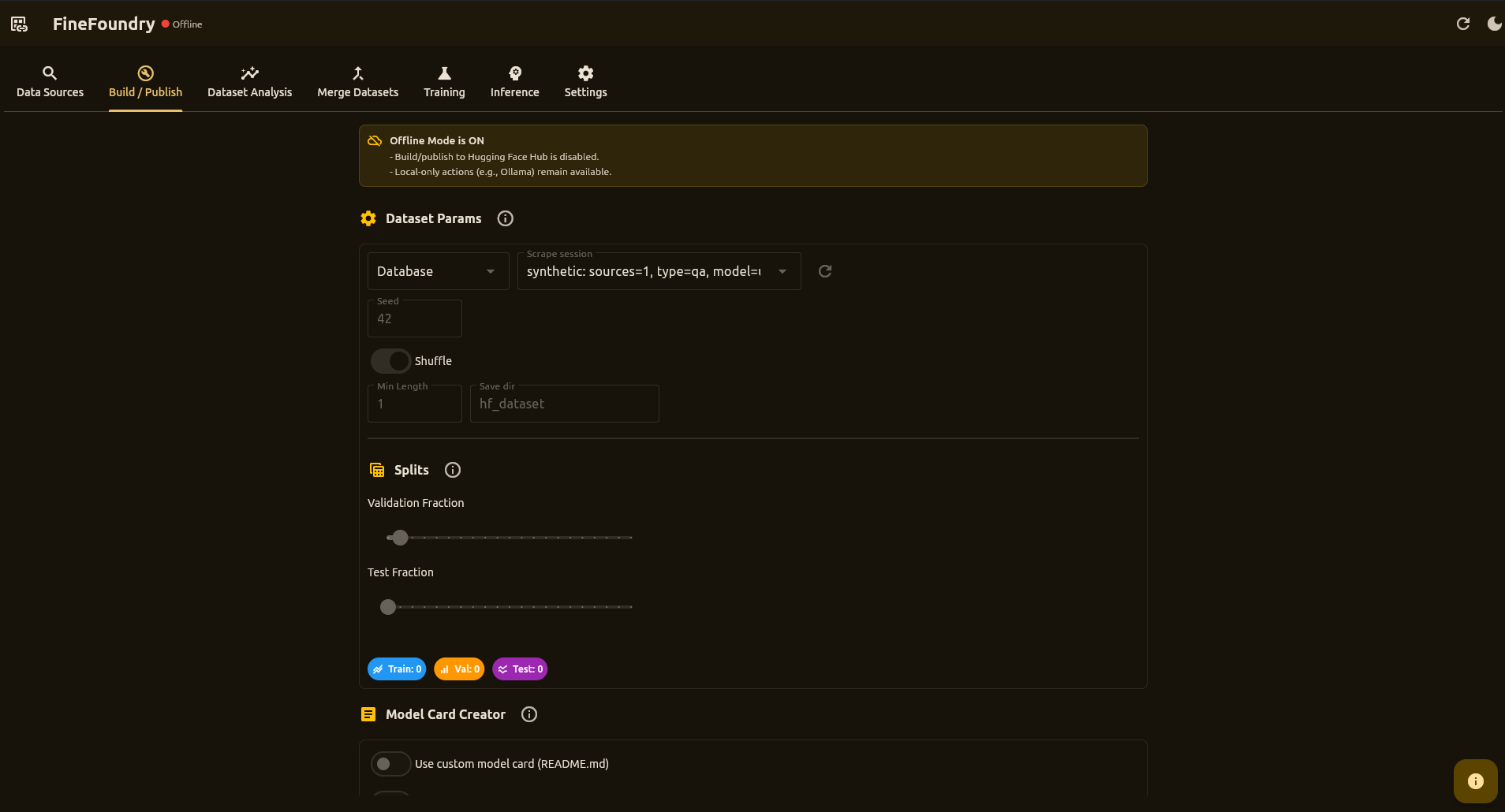
Publish Tab

Publish datasets and LoRA adapters (Phase 1) directly to Hugging Face Hub.

Publish Tab Screenshot
Workflow
  1. Select a database session from your scrape history
  2. Configure split ratios with sliders (train/val/test)
  3. Set shuffle and random seed for reproducibility
  4. Click Build Dataset to create splits
  5. Optionally push to Hugging Face Hub with auto-generated dataset card
Publish model (adapter)
  • Select a completed training run
  • Set model repo ID + privacy
  • Click Publish adapter to upload the LoRA adapter folder
Hub Integration
  • Authenticate with your HF token (Settings tab or inline)
  • Specify repo ID (e.g., username/my-dataset)
  • Auto-generate README with dataset statistics
  • Private or public repository options

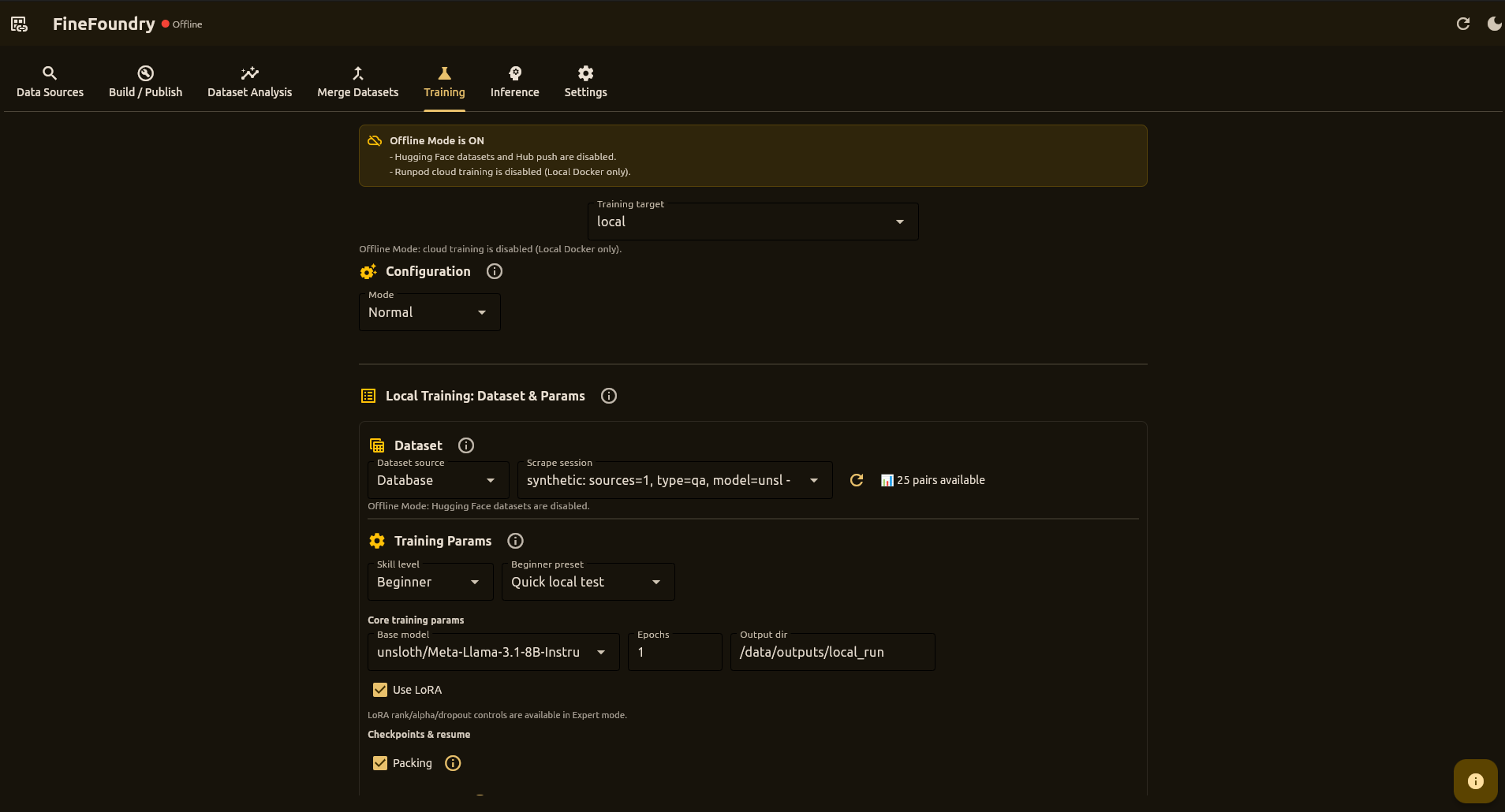
Training Tab

Fine-tune LLMs using an Unsloth-based LoRA training stack on RunPod or locally via Docker.

Training Tab Screenshot
Training Targets
RunPod

Cloud GPU training with automated pod and network volume management

Local Docker

Train on your local GPU using the same Unsloth trainer image

Under the Hood

Both targets use docker.io/sbussiso/unsloth-trainer:latest with:

  • PyTorch for accelerated training
  • Hugging Face Transformers for model loading
  • bitsandbytes for 4-bit quantization
  • PEFT / LoRA via Unsloth for parameter-efficient fine-tuning
Key Features
  • Beginner and Advanced hyperparameter modes
  • Save and load training configurations (stored in database)
  • Select dataset from database sessions or Hugging Face
  • Auto-resume from checkpoints
  • Quick Local Inference with sample prompts from training dataset
  • Export chat history to text files
  • Training runs tracked in database with logs and metadata

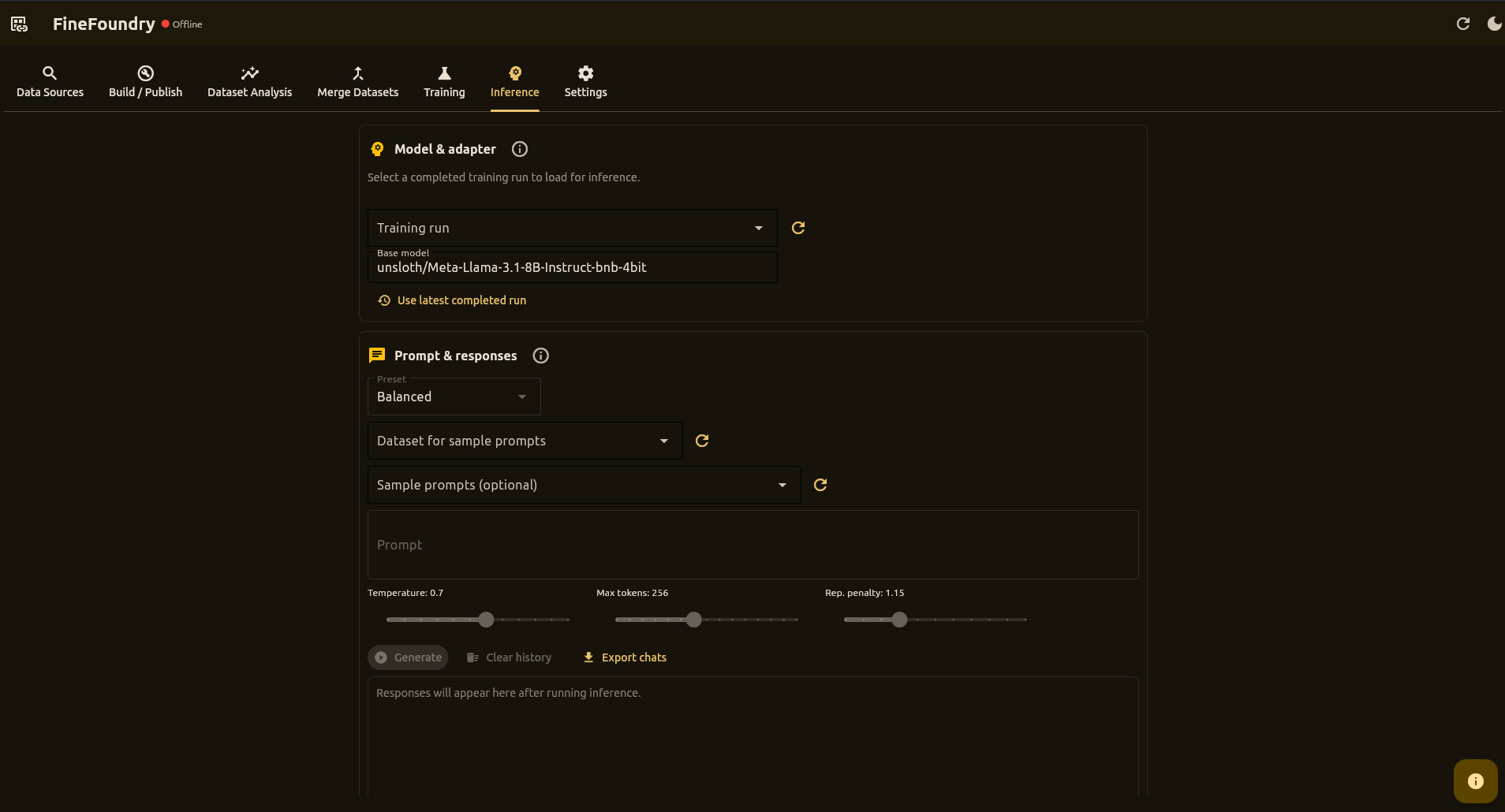
Inference Tab

Run local inference against adapters from completed training runs with prompt history and Full Chat View.

Inference Tab Screenshot
Features
  • Training run selection: Choose a completed training run (FineFoundry loads the adapter path automatically)
  • Instant Validation: Verify adapter files before loading
  • Dataset Selector: Sample prompts from any saved dataset in the database
  • Sample Prompts: Get 5 random prompts from selected dataset for quick testing
  • Generation Presets: Deterministic, Balanced, Creative, or Custom
  • Full Chat View: Multi-turn conversation dialog with proper chat templates
  • Export Chats: Save prompt/response history to text files
  • Prompt History: Scroll through previous prompts and responses
Under the Hood

Powered by the same stack as training:

  • Transformers (AutoModelForCausalLM, AutoTokenizer)
  • PEFT (PeftModel) for adapter loading
  • bitsandbytes 4-bit quantization on CUDA
  • Chat Templates for instruct models (Llama-3.1, etc.)
  • Repetition Penalty to prevent degenerate outputs
  • 100% local - no external API calls

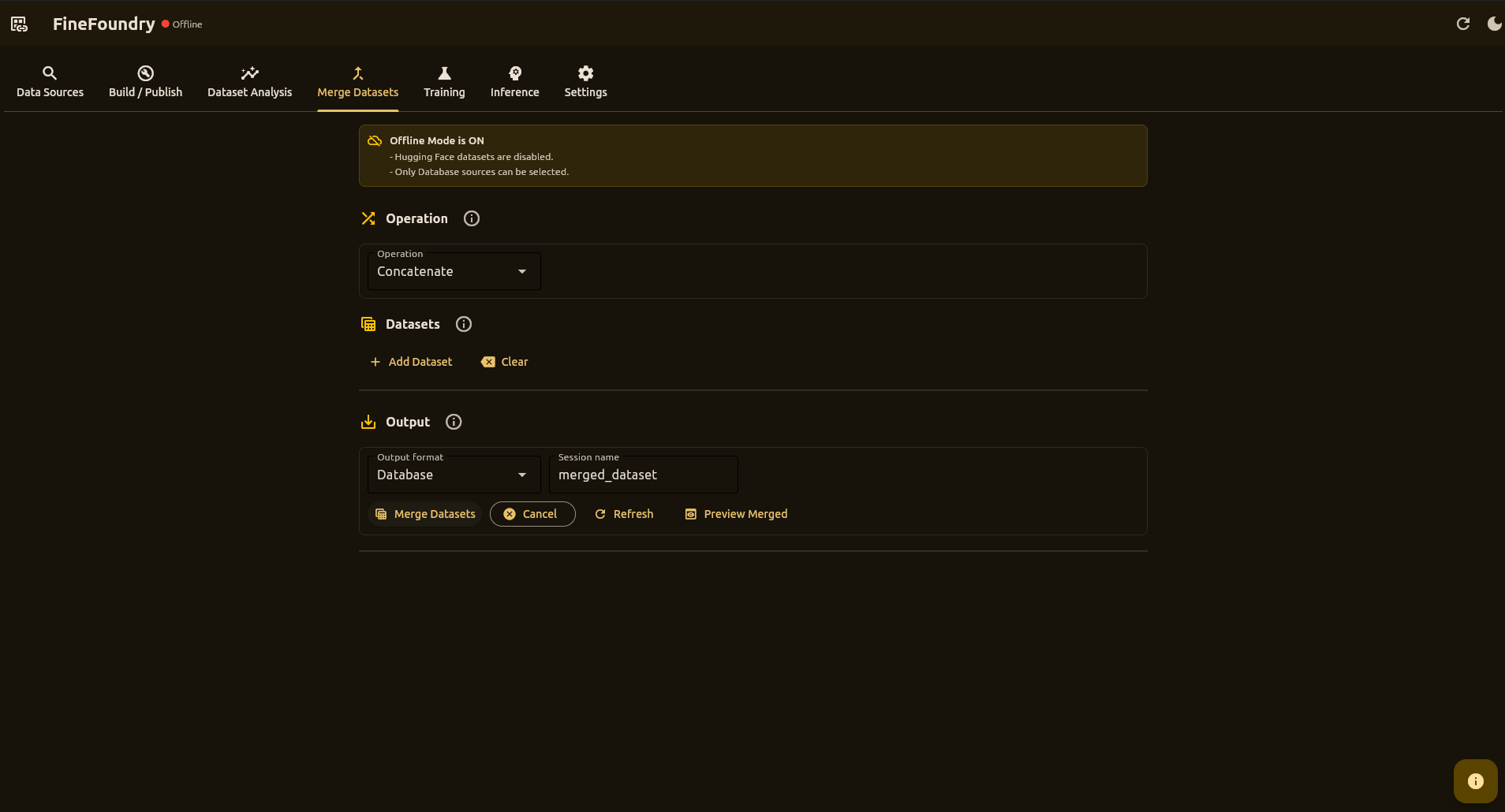
Merge Datasets

Combine multiple database sessions (and optionally Hugging Face datasets when online) into a unified training set.

Merge Datasets Tab Screenshot
Supported Sources
  • Database sessions from scrape history
  • Hugging Face Hub datasets
  • Mixed sources in a single merge
Features
  • Automatic Column Mapping: Align different column names
  • Filtering: Remove empty rows and normalize text
  • Preview: Inspect merged results before saving
  • Database Storage: Merged data saved to new database session
  • Optional Export: Export to JSON for external tools

Dataset Analysis

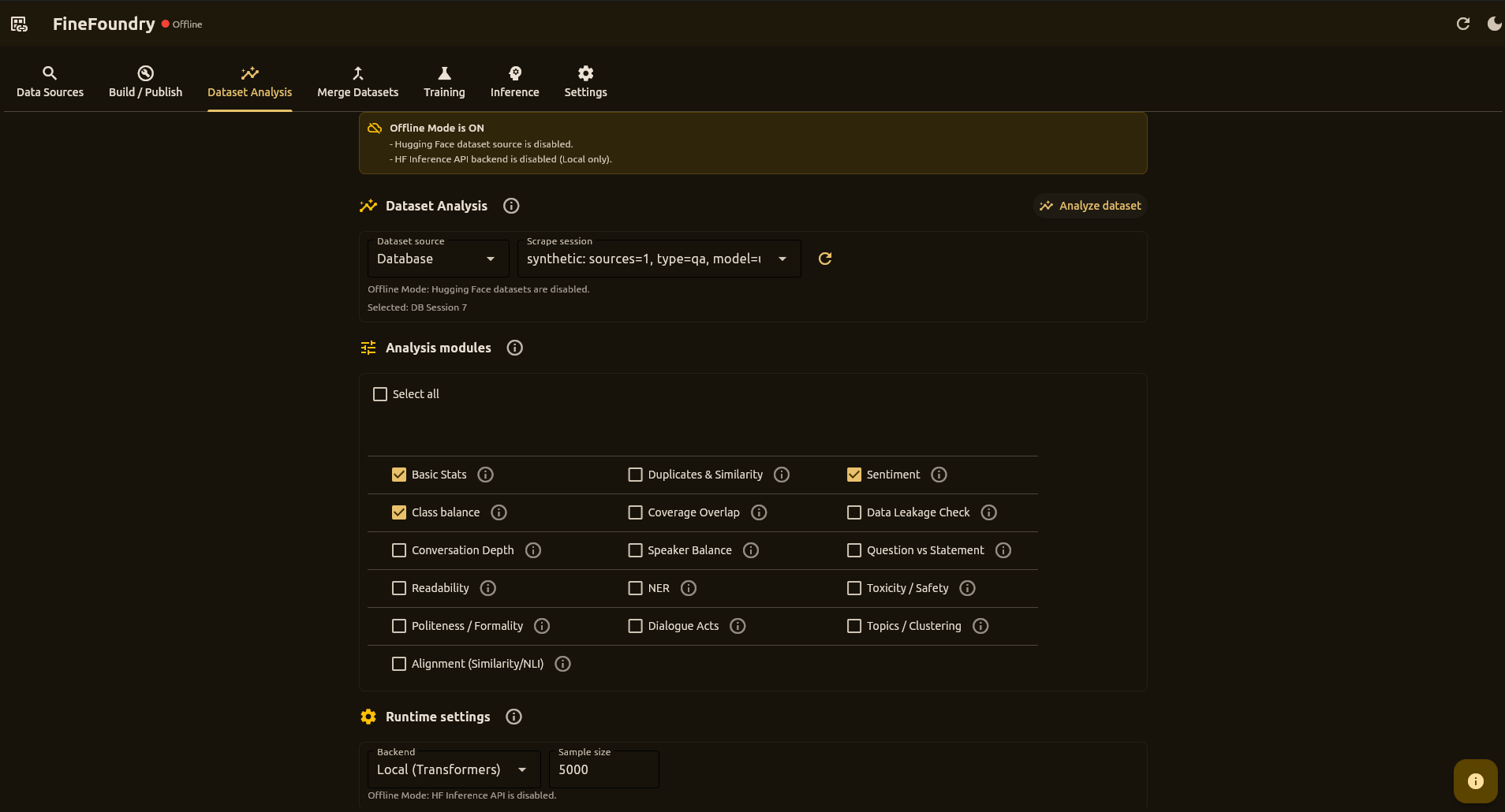
Comprehensive quality analysis with togglable modules for different metrics.

Dataset Analysis Tab Screenshot
Analysis Modules
  • Sentiment Analysis
  • Toxicity Detection
  • Duplicate Detection
  • Data Leakage Check
  • Class Balance
  • Readability Metrics

CLI & API

Automate FineFoundry workflows with command-line tools and Python APIs.

Reddit Scraper CLI
uv run src/scrapers/reddit_scraper.py \
  --url https://www.reddit.com/r/AskReddit/ \
  --max-posts 50 \
  --mode contextual \
  --pairs-path reddit_pairs.json
Dataset Builder CLI
uv run src/save_dataset.py
Programmatic Scraping
from src.scrapers.fourchan_scraper import scrape

pairs = scrape(
    board="pol",
    max_threads=150,
    max_pairs=5000,
    mode="contextual",
    strategy="cumulative"
)

Deployment

Run training jobs in containers on RunPod or locally.

Local Docker

Default image: docker.io/sbussiso/unsloth-trainer:latest

  • Volume mounts for datasets and outputs
  • Same LoRA stack as RunPod
  • GPU passthrough with NVIDIA runtime
RunPod

Cloud GPU training with automated infrastructure

  • Network volume for persistent storage
  • Pod template auto-creation
  • Outputs at /data/outputs/...

Settings

Configure authentication, proxies, integrations, and run a built-in System Check diagnostics panel.

Configuration Options
  • Hugging Face Token: For Hub push/pull operations
  • RunPod API Key: For cloud training
  • Proxy Settings: Per-scraper proxy configuration (including Tor)
  • Ollama Integration: For AI-generated dataset cards
  • System Check Diagnostics: One-click system health check (pytest + coverage) with live logs, grouped summary cards, and log export.
All data is stored locally in a SQLite database (finefoundry.db) and never sent to external servers.

Community & Support

Join the FineFoundry community

FineFoundry-Core

Desktop studio for dataset curation and model fine-tuning

View Repository

Contributing

FineFoundry is open source and welcomes contributions! Whether you're adding new scrapers, improving analysis modules, enhancing the UI, or fixing bugs, your input is valuable.

Technology Stack

Python 3.10+

Flet

Datasets (HF)

Docker

PyTorch

RunPod

Hugging Face Hub

REST APIs

Unsloth

Transformers

PEFT / LoRA

bitsandbytes

SyntheticDataKit

vLLM

SQLite